
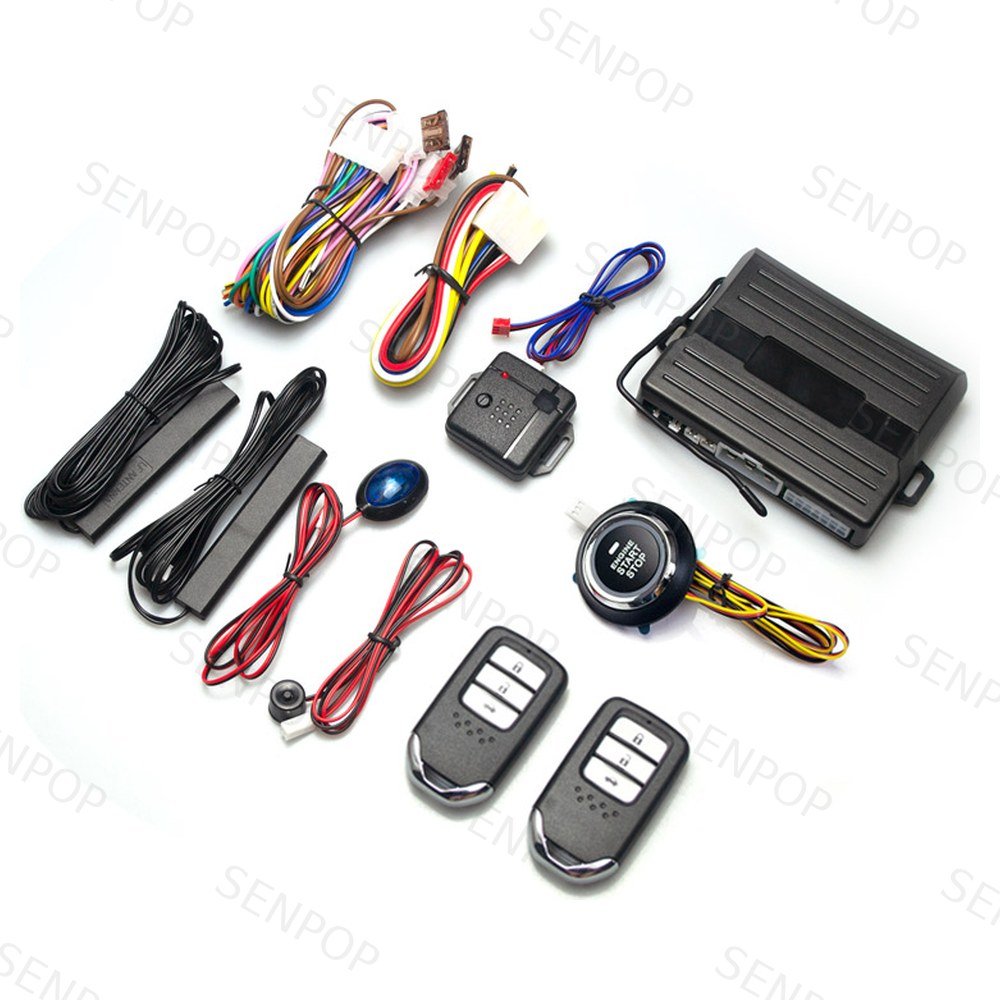
This is the complete 8803 operating manual, published as a web page. Everything in the printed booklet that ships with the unit is here: the remote functions, the PKE enable/disable procedure, remote start rules, smart key learning, the specification table and the full wiring diagram. Bookmark it — the page is searchable, the paper is not.
Each scanned page below carries a SENPOP watermark; the text sections are a lightly edited transcription of the same content, reorganised so you can find a procedure in seconds. Where the original booklet used compressed phrasing, we have expanded it without changing any technical value.
The Remote Controls
The 8803 ships with LCD two-way remotes (the booklet illustrates three remote styles: S-X1, S-X5 and S-X3). Each remote carries four buttons:
- Lock button
- Unlock button
- Trunk button (AUX)
- Middle button — mute arm/disarm
The remote battery is a CR2032. The remote operates at 433.92 MHz with a rolling-code core.
Main Functions
- Passive keyless entry (PKE) system
- Push button start / stop system
- Service mode; mute mode
- PKE function enable or disable
- Detects the car situation by itself; rolling-code protection
- Remote start / stop engine function
- Illegal-start alarm
Operating Descriptions
1–2. Passive arm and disarm
Arm/lock: when the remote is taken more than 3–5 metres from the car, the siren sounds once and the system arms and locks the doors automatically (silent under mute mode).
Disarm/unlock: when the remote comes back within about 2 metres, the system disarms and unlocks automatically (silent under mute mode).
3. Mute arm or disarm
Press the remote's middle button once to enter mute arm. To exit mute mode: press unlock once, then press the middle button once. In mute mode the siren does not sound when the alarm triggers.
4. PKE function enable & disable
4.1 In disarm status, hold the lock and unlock buttons together for 6 seconds — one siren chirp means PKE is enabled (the system will only lock/unlock by remote). Repeat the same action and three chirps means PKE is disabled.
4.2 If the remote is not used for more than 2 days, the PKE function switches off automatically — this is a remote power-saving feature, not a fault. Use the remote again to restore it.
5. Remote engine start instructions
- 5.1 In armed mode, press and hold the lock button for more than 5 seconds: one chirp and the engine attempts to start. Repeat the same operation to stop it.
- 5.2 After a remote start, the engine shuts off automatically within 10 minutes if no door has been unlocked and the brake has not been pressed.
- 5.3 If the engine is running, it will not be shut off just because the smart keys leave the PKE antenna range — this is deliberate, for safety.
- 5.4 If the engine is off and the smart key is out of the PKE antenna range, nobody can start or drive the car without the smart key — this is the smart-key identification function.
- 5.5 Keep the gear in neutral before a remote start.
- 5.6 Remote start requires connecting the black oil-path (fuel supply) wire. It is a positive feed that has power only while starting; after the engine stops, the oil-path wire has no power.
6. Alarm
- 6.1 Without the smart key near the car, the engine will be shut off.
- 6.2 If the car is running, the smart key goes out of range, the engine is shut off and a door is opened — the system enters alarm status and the car cannot be restarted.
- 6.3 In alarm status, illegally treading the foot brake sounds the siren for 25 seconds.
7. Smart key (remote) program
Power on, hold the learning button for 10 seconds to enter learning mode, then press any button on a remote to finish learning it. Both remotes must be learned within 10 seconds. The learning button doubles as the reset button: holding it emergency-disarms an illegally triggered alarm.
8. Touch keyboard (optional)
If both smart keys are damaged or lost, the optional code keyboard can disarm the system and start the car. This function is optional — confirm whether the unit you ordered includes it.
9. Central lock automation
Open the door, tread the footbrake and start the engine: after 15 seconds the doors lock automatically while driving. After turning the engine off, all doors unlock automatically.
10. Emergency disarm
If both smart keys are lost or damaged: press and hold the emergency reset button for about 7 seconds until the alarm disarms; the car can then be driven normally. If no ignition is made after the emergency disarm, the system re-arms automatically after about 2 minutes. Press the emergency button once to exit the emergency mode.
11. Service mode
With the engine off, hold the remote unlock button — the system enters service mode and the PKE function switches off. Press unlock again and the PKE function returns to normal. Use this at car washes and workshops (the concept is the same as the 101's emergency release).
12. Push start / stop engine
- 12.1 Unlock the door, tread the brake, press the button once to start or stop the engine.
- 12.2 In winter: unlock, press the brake, press and hold the button to start or stop.
- 12.3 Without pressing the brake: press and hold the button to start the engine.
- 12.4 Without pressing the brake: each single press cycles ACC → ON → OFF.
Specifications
| Main unit system | Remote control | ||
|---|---|---|---|
| Operating voltage | DC 12V ± 3V | Operating voltage | DC 3V |
| Static current | 15 mA (excl. indicator, sensor) | Static current | 8 µA |
| PKE emission current | 40 mA | Transmit power | 0 dBm |
| Shock sensor current | <1 mA | Battery | CR2032 |
| Coding | Learning code | Coding | Learning code |
| Frequency | 433.92 MHz / 428 MHz | Frequency | 433.92 MHz / 428 MHz |
| ACC / Start current | 30 A / 30 A | — | — |
Troubleshooting
| Problem | Possible causes | Solutions |
|---|---|---|
| Remote has no response, or response is not sensitive | 1. Low remote battery 2. Remote is broken 3. Electromagnetic interference near the car | 1. Change the battery 2–3. Use the optional password keyboard |
| Step on the brake, can't start when pressing the ignition switch | 1. Brake signal is not normal 2. Ignition switch broken | 1. Start with the remote from a long distance 2. Use the standby start scheme 1 or 2 (see the installation manual) |
| No sound from the horn when pressing the lock button | 1. In mute mode 2. In car-washing (service) mode 3. Horn is broken | 1. Quit mute mode 2. Quit car-washing mode 3. Change or fix the horn |
| Cannot start | 1. Low remote battery 2. Induction chip failure (if fitted) 3. Automatic gear not in park 4. Handbrake cable wrongly fitted 5. Oil pump cable wrongly fitted | 1. Change the battery 2. Have a professional check the chip 3. Shift to park 4. Check the handbrake cable switch and its connection 5. Make sure the oil pump cable is correctly connected |
If a symptom is not in this table, work through the general diagnostic order in Push Button Lit but Engine Won't Crank: 7 Checks — it applies to any push start kit in our range, including the 8803.
Installation and Wiring
The booklet's installation section covers the steering-wheel lock release, the original induction coil handling, chip placement (cut the key blank 1 mm outside the lock and secure the sample key inside the coil so the original immobiliser always sees it — the principle we explain in the transponder chip article), and the PKE low-frequency antennas (one at the lower left, one at the lower right behind the windscreen, inside the car).
The full wiring diagram is on page 2 below. One detail worth calling out because customers ask for it by name: the main connector on the control box is a 14-pin (14P) plug — direction lights, trunk release, ACC, IGN1, IGN2 (ON1), central-lock control, brake and hand-brake feeds all land on it. Wire colour assignments follow the printed diagram and the label on the harness; do not apply them across different models.
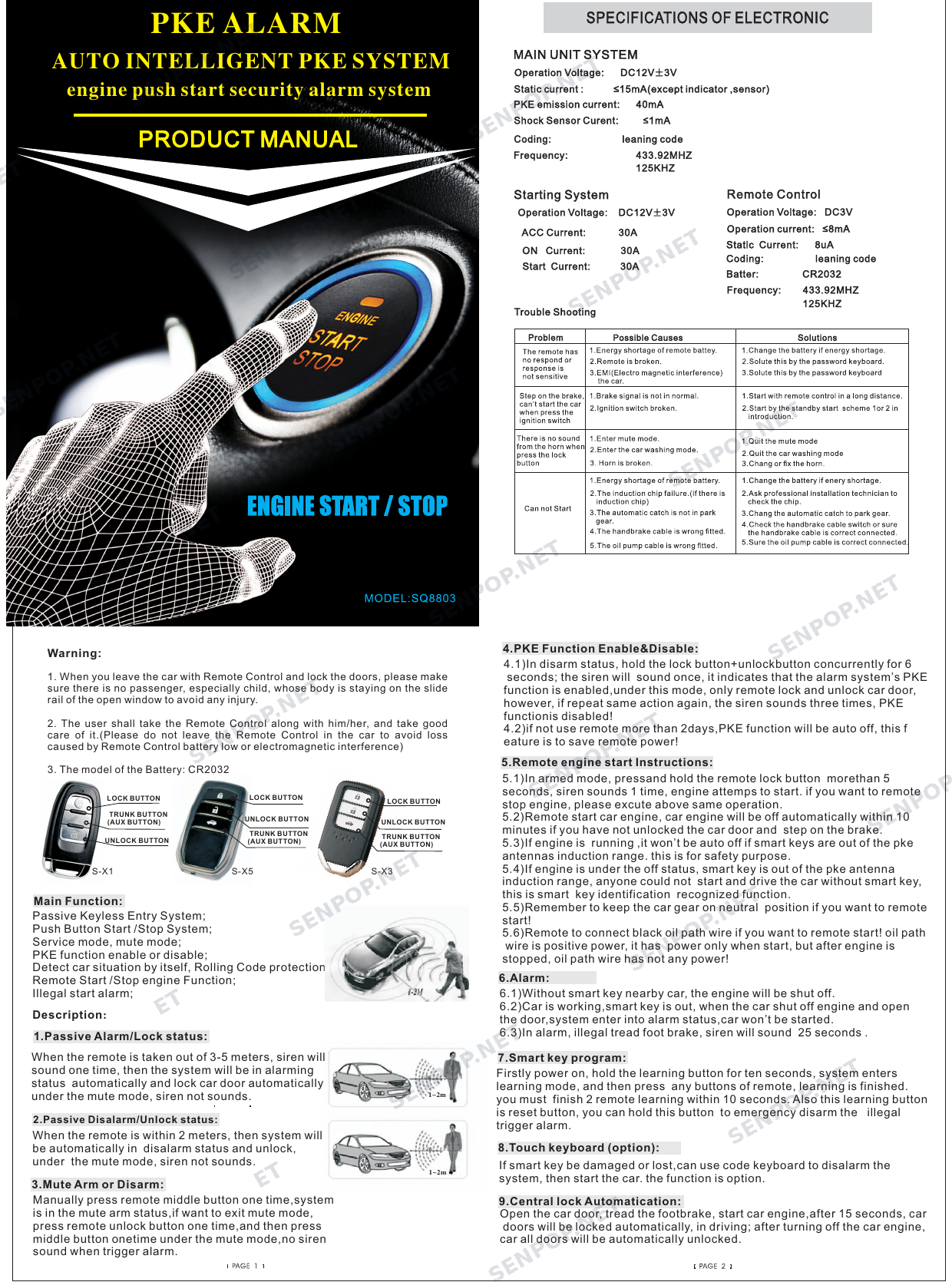
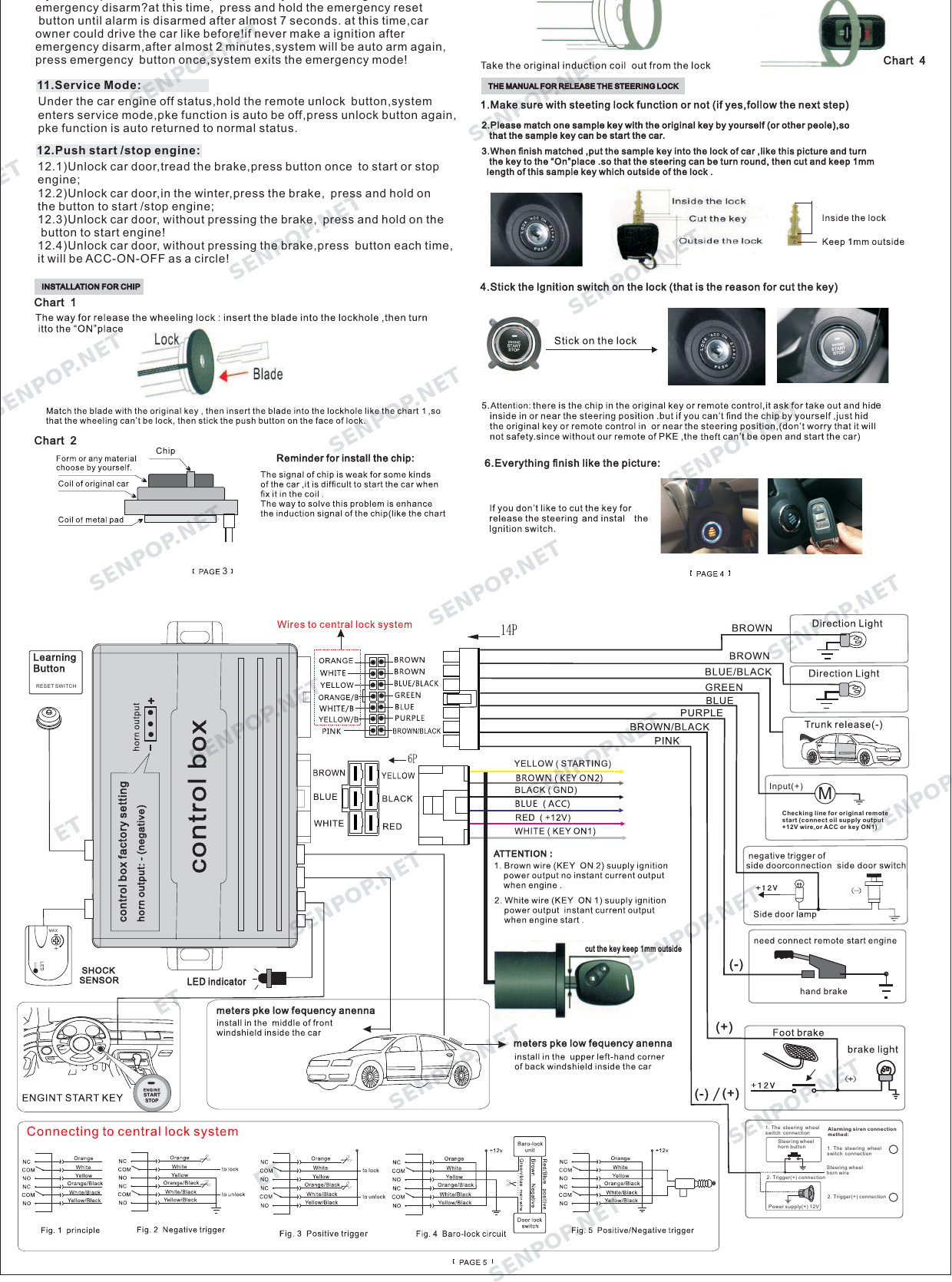
This page is a transcription of the printed 8803 product manual supplied with the unit, lightly edited for clarity; the scanned pages are watermarked SENPOP. Where any wording differs, the booklet shipped in the box is the authoritative reference — and if yours is missing, ask us and we will send the original PDF.
Warnings
- When leaving the car with the remote and locking the doors, make sure no passenger — especially a child — has any body part on the slide rail of an open window, to avoid injury.
- Take the remote with you and look after it. Do not leave it in the car (loss, low battery, or electromagnetic interference can all leave you locked out).
- Remote battery type: CR2032.
Need the manual for another model?
Tell us the model code on the control box, and we will send the matching manual — or publish it here like this one.
Ask for a manual →Related Reading
- 8803 PKE Keyless Entry System — the product page with kit contents and versions
- How PKE Keyless Entry Works — why the 3–5 m arm and 2 m disarm zones behave the way this manual describes
- Push Button Lit but Engine Won't Crank: 7 Checks — the diagnostic order when the table above does not cover it
- Why the Original Transponder Chip Must Stay in the Coil — the full story behind the chip placement step